通过购物信息组,您可以对产品进行分组。 在界面中,这称为产品组。您可以使用多个维度进行分组,以便包含或排除产品。
分组时,请考虑使用这样的树状结构:在第一级,将产品按条件划分为全新、二手和其他产品条件;然后在第二级,将其他产品条件中的产品按品牌划分为“CoolBrand”产品、“CheapBrand”和其他品牌。
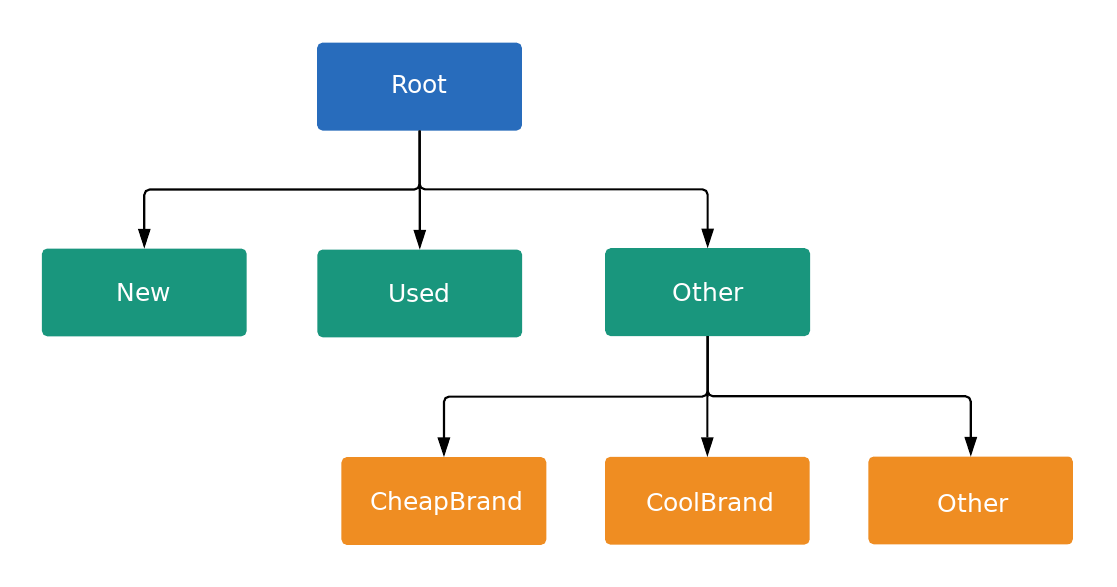
树状结构中的每个节点要么是一个子类,要么是一个单元,具体由 ListingGroupType 指定。子类会在树状结构中延伸出一个新的级别,相当于树枝,而单元则是树状结构上的树叶。每个子类之间必须始终完全分割开来,因此必须包含一个代表其他的节点。在下面的示例中,root 和 Product Condition: (Other) 节点都是子类。这种包含子类和单元的树状结构允许您在单元级别设置出价,并确保每个产品属于且只属于树状结构中的一个单元节点。
您只能针对关联的 ListingGroupInfo.type 为 UNIT 的 AdGroupCriterion 设置出价。
当 AdGroupCriterion 的 negative 设置为默认值 false,且 ListingGroupInfo.type 设置为 UNIT 时,如果广告组的出价策略要求在条件一级设置出价(例如“每次点击费用人工出价”),您必须提供出价值。例如,您需要在 AdGroupCriterion 上设置 cpc_bid_micros 字段。如果您未能为正 UNIT 节点提供必需的出价,则会收到错误消息。
如果 ListingGroupInfo.type 为 SUBDIVISION,则无法为 AdGroupCriterion 设置出价。如果 AdGroupCriterion 的 negative 设置为 true,则出价不适用,因为这是排除对象。
节点是 ListingGroupInfo 类的对象,其中包含 ListingGroupType 字段,用于指示节点是单元还是子类。将 AdGroupCriterion 的 ListingGroupInfo 设置为 listing_group 会将其与 AdGroup 相关联。
您需要提供至少一个单元节点才能使树状结构生效。该单位可以是根节点,然后成为“所有产品”部门。只有在创建了有效的产品信息组树状结构后,广告才会投放。
设置每次点击费用人工出价
您只能在单元节点上设置 AdGroupCriterion 的 cpc_bid_micros。在子类节点上尝试执行此项设置操作,将会失败并显示错误。
信息维度
ListingGroupInfo 还具有一个 case_value,该 case_value 是一个 ListingDimensionInfo,包含几种维度类型中的一种。ListingGroupInfo 表示与您的产品相关联的值,例如优惠 ID、品牌或产品状况。有关可用的 ListingDimensionInfo 类型的完整说明,请参阅参考文档。
子类的每个子级都必须具有属于相同 ListingDimensionInfo 子类型的 case_value。但根节点除外,它没有 case_value。
另请注意,每个子类必须包含一个正确类型的“空”case_value。该子级通常称为其他,因为它表示相应 ListingDimensionInfo 的“所有其他值”。
如需了解更多详情,请查看下面为产品信息组树状结构添加第一级条件的代码段。
Java
private void runExample(
    GoogleAdsClient googleAdsClient,
    long customerId,
    long adGroupId,
    boolean replaceExistingTree) {
  // 1) Optional: Removes the existing listing group tree, if it already exists on the ad group.
  if (replaceExistingTree) {
    removeListingGroupTree(googleAdsClient, customerId, adGroupId);
  }
  // Creates a list of ad group criterion to add.q
  List<AdGroupCriterionOperation> operations = new ArrayList<>();

  // 2) Constructs the listing group tree "root" node.

  // Subdivision node: (Root node)
  AdGroupCriterion adGroupCriterionRoot =
      createListingGroupSubdivisionRoot(customerId, adGroupId, -1L);
  // Get the resource name that will be used for the root node.
  // This resource has not been created yet and will include the temporary ID as part of the
  // criterion ID.
  String adGroupCriterionResourceNameRoot = adGroupCriterionRoot.getResourceName();
  operations.add(AdGroupCriterionOperation.newBuilder().setCreate(adGroupCriterionRoot).build());

  // 3) Construct the listing group unit nodes for NEW, USED and other

  // Biddable Unit node: (Condition NEW node)
  // * Product Condition: NEW
  // * CPC bid: $0.20
  AdGroupCriterion adGroupCriterionConditionNew =
      createListingGroupUnitBiddable(
          customerId,
          adGroupId,
          adGroupCriterionResourceNameRoot,
          ListingDimensionInfo.newBuilder()
              .setProductCondition(
                  ProductConditionInfo.newBuilder().setCondition(ProductCondition.NEW).build())
              .build(),
          200_000L);
  operations.add(
      AdGroupCriterionOperation.newBuilder().setCreate(adGroupCriterionConditionNew).build());

  // Biddable Unit node: (Condition USED node)
  // * Product Condition: USED
  // * CPC bid: $0.10
  AdGroupCriterion adGroupCriterionConditionUsed =
      createListingGroupUnitBiddable(
          customerId,
          adGroupId,
          adGroupCriterionResourceNameRoot,
          ListingDimensionInfo.newBuilder()
              .setProductCondition(
                  ProductConditionInfo.newBuilder().setCondition(ProductCondition.USED).build())
              .build(),
          100_000L);
  operations.add(
      AdGroupCriterionOperation.newBuilder().setCreate(adGroupCriterionConditionUsed).build());

  // Sub-division node: (Condition "other" node)
  // * Product Condition: (not specified)
  AdGroupCriterion adGroupCriterionConditionOther =
      createListingGroupSubdivision(
          customerId,
          adGroupId,
          -2L,
          adGroupCriterionResourceNameRoot,
          ListingDimensionInfo.newBuilder()
              // All sibling nodes must have the same dimension type, even if they don't contain a
              // bid.
              // parent
              .setProductCondition(ProductConditionInfo.newBuilder().build())
              .build());
  // Gets the resource name that will be used for the condition other node.
  // This resource has not been created yet and will include the temporary ID as part of the
  // criterion ID.
  String adGroupCriterionResourceNameConditionOther =
      adGroupCriterionConditionOther.getResourceName();
  operations.add(
      AdGroupCriterionOperation.newBuilder().setCreate(adGroupCriterionConditionOther).build());

  // 4) Constructs the listing group unit nodes for CoolBrand, CheapBrand and other

  // Biddable Unit node: (Brand CoolBrand node)
  // * Brand: CoolBrand
  // * CPC bid: $0.90
  AdGroupCriterion adGroupCriterionBrandCoolBrand =
      createListingGroupUnitBiddable(
          customerId,
          adGroupId,
          adGroupCriterionResourceNameConditionOther,
          ListingDimensionInfo.newBuilder()
              .setProductBrand(ProductBrandInfo.newBuilder().setValue("CoolBrand").build())
              .build(),
          900_000L);
  operations.add(
      AdGroupCriterionOperation.newBuilder().setCreate(adGroupCriterionBrandCoolBrand).build());

  // Biddable Unit node: (Brand CheapBrand node)
  // * Brand: CheapBrand
  // * CPC bid: $0.01
  AdGroupCriterion adGroupCriterionBrandCheapBrand =
      createListingGroupUnitBiddable(
          customerId,
          adGroupId,
          adGroupCriterionResourceNameConditionOther,
          ListingDimensionInfo.newBuilder()
              .setProductBrand(ProductBrandInfo.newBuilder().setValue("CheapBrand").build())
              .build(),
          10_000L);
  operations.add(
      AdGroupCriterionOperation.newBuilder().setCreate(adGroupCriterionBrandCheapBrand).build());

  // Biddable Unit node: (Brand other node)
  // * Brand: CheapBrand
  // * CPC bid: $0.01
  AdGroupCriterion adGroupCriterionBrandOther =
      createListingGroupUnitBiddable(
          customerId,
          adGroupId,
          adGroupCriterionResourceNameConditionOther,
          ListingDimensionInfo.newBuilder()
              .setProductBrand(ProductBrandInfo.newBuilder().build())
              .build(),
          50_000L);
  operations.add(
      AdGroupCriterionOperation.newBuilder().setCreate(adGroupCriterionBrandOther).build());

  // Issues a mutate request to add the ad group criterion to the ad group.
  try (AdGroupCriterionServiceClient adGroupCriterionServiceClient =
      googleAdsClient.getLatestVersion().creat<eAdGroupCriterionServiceClie>nt()) {
    ListMutateAdGroupCriterionResult mutateAdGroupCriteriaResults =
        adGroupCriterionServiceClient
            .mutateAdGroupCriteria(Long.toString(customerId), operations)
            .getResultsList();
    for (MutateAdGroupCriterionResult mutateAdGroupCriterionResult :
        mutateAdGroupCriteriaResults) {
      System.out.printf(
          "Added ad group criterion for listing group with resource name: '%s'%n",
         mutateAdGroupCriterionResult.getResour