产品信息组用于效果最大化广告系列,可指定要在每个素材资源组中包含或排除哪些产品。因此,商品详情组是在 AssetGroup 级别使用 AssetGroupListingGroupFilter 对象应用的。这与其他类型的零售广告系列类似,在这些广告系列中,商品组是在 AdGroup 级应用的。
效果最大化广告系列中的所有素材资源组都需要包含由 AssetGroupListingGroupFilter 对象组成的有效商品分区树。您可以使用包含 Merchant Center 账号中所有商品的单个节点树来满足此要求。
在界面中,这称为产品组。您可以使用多个维度进行分组,以便包含或排除产品。
分组时,请考虑使用这样的树状结构:在第一级,将产品按条件划分为全新、二手和其他产品条件;然后在第二级,将其他产品条件中的产品按品牌划分为“CoolBrand”产品、“CheapBrand”和其他品牌。
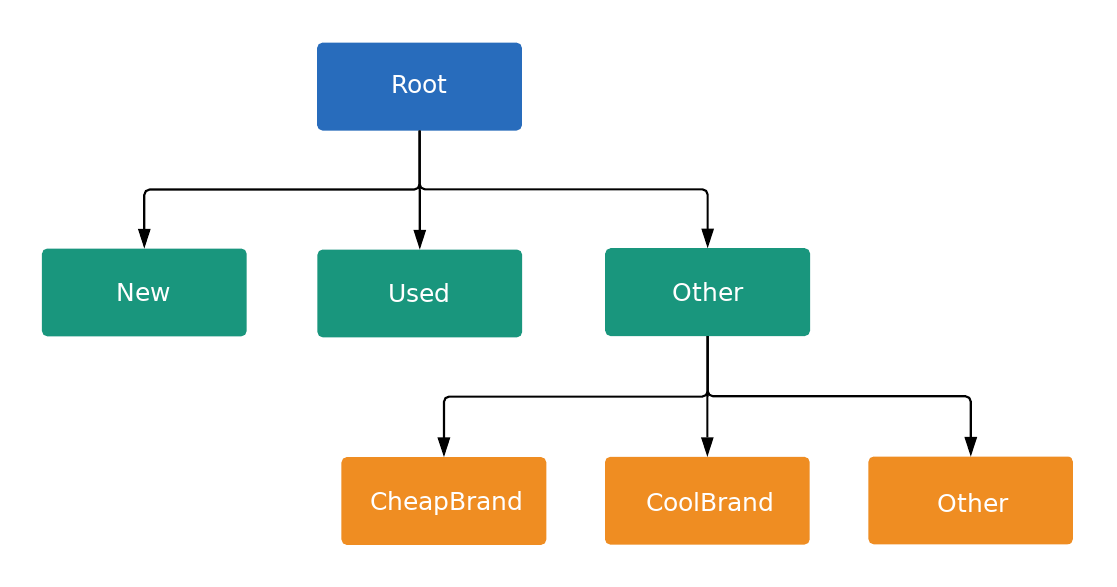
树状结构中的每个节点要么是一个子类,要么是一个单元,具体由 ListingGroupType 指定。子类会在树状结构中延伸出一个新的级别,相当于树枝,而单元则是树状结构上的树叶。每个子类之间必须始终完全分割开来,因此必须包含一个代表其他的节点。在下面的示例中,root 和 Product Condition: (Other) 节点都是子类。这种包含子类和单元的树状结构允许您在单元级别设置出价,并确保每个产品属于且只属于树状结构中的一个单元节点。
您只能针对关联的 ListingGroupInfo.type 为 UNIT 的 AdGroupCriterion 设置出价。
当 AdGroupCriterion 的 negative 设置为默认值 false,且 ListingGroupInfo.type 设置为 UNIT 时,如果广告组的出价策略要求在条件一级设置出价(例如“每次点击费用人工出价”),您必须提供出价值。例如,您需要在 AdGroupCriterion 上设置 cpc_bid_micros 字段。如果您未能为正 UNIT 节点提供必需的出价,则会收到错误消息。
如果 ListingGroupInfo.type 为 SUBDIVISION,则无法为 AdGroupCriterion 设置出价。如果 AdGroupCriterion 的 negative 设置为 true,则出价不适用,因为这是排除对象。
节点是 ListingGroupInfo 类的对象,其中包含 ListingGroupType 字段,用于指示节点是单元还是子类。将 AdGroupCriterion 的 ListingGroupInfo 设置为 listing_group 会将其与 AdGroup 相关联。
您需要提供至少一个单元节点才能使树状结构生效。该单位可以是根节点,然后成为“所有产品”部门。只有在创建了有效的产品信息组树状结构后,广告才会投放。
效果最大化广告系列产品信息组
效果最大化广告系列中的产品信息组在定位一组产品时效果最佳,因此应优先考虑这种方式,而不是按商品 ID 定位单个产品。您可以使用商品 Feed 中的不同维度(例如自定义标签或品牌)来对商品进行分组。
代码示例
Java
/**
 * Runs the example.
 *
 * @param googleAdsClient the Google Ads API client.
 * @param customerId the client customer ID.
 * @param assetGroupId the asset group id for the Performance Max campaign.
 * @param replaceExistingTree option to remove existing product tree from the passed in asset
 *     group.
 * @throws GoogleAdsException if an API request failed with one or more service errors.
 */
private void runExample(
    GoogleAdsClient googleAdsClient,
    long customerId,
    long assetGroupId,
    boolean replaceExistingTree)
    throws Exception {
  String assetGroupResourceName = ResourceNames.assetGroup(customerId, assetGroupId);

  List<MutateOperation> operations = new ArrayList<>();

  if (replaceExistingTree) {
    List<AssetGroupListingGroupFilter> existingListingGroupFilters =
        getAllExistingListingGroupFilterAssetsInAssetGroup(
            googleAdsClient, customerId, assetGroupResourceName);

    if (!existingListingGroupFilters.isEmpty()) {
      // A special factory object that ensures the creation of remove operations in the
      // correct order (child listing group filters must be removed before their parents).
      AssetGroupListingGroupFilterRemoveOperationFactory removeOperationFactory =
          new AssetGroupListingGroupFilterRemoveOperationFactory(existingListingGroupFilters);

      operations.addAll(removeOperationFactory.removeAll());
    }
  }

  // Uses a factory to create all the MutateOperations that manipulate a specific
  // AssetGroup for a specific customer. The operations returned by the factory's methods
  // are used to construct a new tree of filters. These filters can have parent-child
  // relationships, and also include a special root that includes all children.
  //
  // When creating these filters, temporary IDs are used to create the hierarchy between
  // each of the nodes in the tree, beginning with the root listing group filter.
  //
  // The factory created below is specific to a customerId and assetGroupId.
  AssetGroupListingGroupFilterCreateOperationFactory createOperationFactory =
      new AssetGroupListingGroupFilterCreateOperationFactory(
          customerId, assetGroupId, TEMPORARY_ID_LISTING_GROUP_ROOT);

  // Creates the operation to add the root node of the tree.
  operations.add(createOperationFactory.createRoot());

  // Creates an operation to add a leaf node for new products.
  ListingGroupFilterDimension newProductDimension =
      ListingGroupFilterDimension.newBuilder()
          .setProductCondition(
              ProductCondition.newBuilder()
                  .setCondition(ListingGroupFilterProductCondition.NEW)
                  .build())
          .build();
  operations.add(
      createOperationFactory.createUnit(
          TEMPORARY_ID_LISTING_GROUP_ROOT, createOperationFactory.nextId(), newProductDimension));

  // Creates an operation to add a leaf node for used products.
  ListingGroupFilterDimension usedProductDimension =
      ListingGroupFilterDimension.newBuilder()
          .setProductCondition(
              ProductCondition.newBuilder()
                  .setCondition(ListingGroupFilterProductCondition.USED)
                  .build())
          .build();
  operations.add(
      createOperationFactory.createUnit(
          TEMPORARY_ID_LISTING_GROUP_ROOT,
          createOperationFactory.nextId(),
          usedProductDimension));

  // This represents the ID of the "other" category in the ProductCondition subdivision. This ID
  // is saved because the node with this ID will be further partitioned, and this ID will serve as
  // the parent ID for subsequent child nodes of the "other" category.
  long otherSubdivisionId = createOperationFactory.nextId();

  // Creates an operation to add a subdivision node for other products in the ProductCondition
  // subdivision.
  ListingGroupFilterDimension otherProductDimension =
      ListingGroupFilterDimension.newBuilder()
          .setProductCondition(ProductCondition.newBuilder().build())
          .build();
  operations.add(
      // Calls createSubdivision because this listing group will have children.
      createOperationFactory.createSubdivision(
          TEMPORARY_ID_LISTING_GROUP_ROOT, otherSubdivisionId, otherProductDimension));

  // Creates an operation to add a leaf node for products with the brand "CoolBrand".
  ListingGroupFilterDimension coolBrandProductDimension =
      ListingGroupFilterDimension.newBuilder()
          .setProductBrand(ProductBrand.newBuilder().setValue("CoolBrand").build())
          .build();
  operations.add(
      createOperationFactory.createUnit(
          otherSubdivisionId, createOperationFactory.nextId(), coolBrandProductDimension));

  // Creates an operation to add a leaf node for products with the brand "CheapBrand".
  ListingGroupFilterDimension cheapBrandProductDimension =
      ListingGroupFilterDimension.newBuilder()
          .setProductBrand(ProductBrand.newBuilder().setValue("CheapBrand").build())
          .build();
  operations.add(
      createOperationFactory.createUnit(
          otherSubdivisionId, createOperationFactory.nextId(), cheapBrandProductDimension));

  // Creates an operation to add a leaf node for other products in the ProductBrand subdivision.
  ListingGroupFilterDimension otherBrandProductDimension =
      ListingGroupFilterDimension.newBuilder()
          .setProductBrand(ProductBrand.newBuilder().build())
          .build();
  operations.add(
      createOperationFactory.createUnit(
          otherSubdivisionId, createOperationFactory.nextId(), otherBrandProductDimension));

  try (GoogleAdsServiceClient googleAdsServiceClient =
      googleAdsClient.getLatestVersion().createGoogleAdsServiceClient()) {
    MutateGoogleAdsRequest request =
        MutateGoogleAdsRequest.newBuilder()
            .setCustomerId(Long.toString(customerId))
            .addAllMutateOperations(operations)
            .build();
    MutateGoogleAdsResponse response = googleAdsServiceClient.mutate(request);
    printResponseDetails(request, response);
  }
}
C#
/// <summary>
/// Runs the code example.
/// </summary>
/// <param name="client">The Google Ads client.</param>
/// <param name="customerId">The Google Ads customer ID.</param>
/// <param name="assetGroupId">The asset group id for the Performance Max campaign.</param>
/// <param name="replaceExistingTree">Option to remove existing product tree
/// from the passed in asset group.</param>
public void Run(
    GoogleAdsClient client,
    long customerId,
    long assetGroupId,
    bool replaceExistingTree)
{
    GoogleAdsServiceClient googleAdsServiceClient =
        client.GetService(Services.V25.GoogleAdsService);

    string assetGroupResourceName = ResourceNames.AssetGroup(customerId, assetGroupId);

    // We use a factory to create all the MutateOperations that manipulate a specific
    // AssetGroup for a specific customer. The operations returned by the factory's methods
    // are used to optionally remove all AssetGroupListingGroupFilters from the tree, and
    // then to construct a new tree of filters. These filters can have a parent-child
    // relationship, and also include a special root that includes all children.
    //
    // When creating these filters, we use temporary IDs to create the hierarchy between
    // the root listing group filter, and the subdivisions and leave nodes beneath that.
    //
    // The factory specific to a customerId and assetGroupId is created below.
    AssetGroupListingGroupFilterCreateOperationFactory createOperationFactory =
        new AssetGroupListingGroupFilterCreateOperationFactory(
            customerId,
            assetGroupId,
            TEMPORARY_ID_LISTING_GROUP_ROOT
        );

    MutateGoogleAdsRequest request = new MutateGoogleAdsRequest
    {
        CustomerId = customerId.ToString()
    };

    if (replaceExistingTree)
    {
        List<AssetGroupListingGroupFilter> existingListingGroupFilters =
            GetAllExistingListingGroupFilterAssetsInAssetGroup(
                client,
                customerId,
                assetGroupResourceName
            );

        if (existingListingGroupFilters.Count > 0)
        {
            // A special factory object that ensures the creation of remove operations in the
            // correct order (child listing group filters must be removed before their parents).
            AssetGroupListingGroupFilterRemoveOperationFactory removeOperationFactory =
                new AssetGroupListingGroupFilterRemoveOperationFactory(
                    existingListingGroupFilters
                );

            request.MutateOperations.AddRange(removeOperationFactory.RemoveAll());
        }
    }

    request.MutateOperations.Add(createOperationFactory.CreateRoot());

    request.MutateOperations.Add(
        createOperationFactory.CreateUnit(
            TEMPORARY_ID_LISTING_GROUP_ROOT,
            createOperationFactory.NextId(),
            new ListingGroupFilterDimension()
            {
                ProductCondition = new ListingGroupFilterDimension.Types.ProductCondition()
                {
                    Condition = ListingGroupFilterProductCondition.New
                }
            }
        )
    );

    request.MutateOperations.Add(
        createOperationFactory.CreateUnit(
            TEMPORARY_ID_LISTING_GROUP_ROOT,
            createOperationFactory.NextId(),
            new ListingGroupFilterDimension()
            {
                ProductCondition = new ListingGroupFilterDimension.Types.ProductCondition()
                {
                    Condition = ListingGroupFilterProductCondition.Used
                }
            }
        )
    );

    // We save this ID because create child nodes underneath it.
    long subdivisionIdConditionOther = createOperationFactory.NextId();

    request.MutateOperations.Add(
        // We're calling CreateSubdivision because this listing group will have children.
        createOperationFactory.CreateSubdivision(
            TEMPORARY_ID_LISTING_GROUP_ROOT,
            subdivisionIdConditionOther,
            new ListingGroupFilterDimension()
            {
                // All sibling nodes must have the same dimension type. We use an empty
                // ProductCondition to indicate that this is an "Other" partition.
                ProductCondition = new ListingGroupFilterDimension.Types.ProductCondition()
            }
        )
    );

    request.MutateOperations.Add(
        createOperationFactory.CreateUnit(
            subdivisionIdConditionOther,
            createOperationFactory.NextId(),
            new ListingGroupFilterDimension()
            {
                ProductBrand = new ProductBrand()
                {
                    Value = "CoolBrand"
                }
            }
        )
    );

    request.MutateOperations.Add(
        createOperationFactory.CreateUnit(
            subdivisionIdConditionOther,
            createOperationFactory.NextId(),
            new ListingGroupFilterDimension()
            {
                ProductBrand = new ProductBrand()
                {
                    Value = "CheapBrand"
                }
            }
        )
    );

    request.MutateOperations.Add(
        createOperationFactory.CreateUnit(
            subdivisionIdConditionOther,
            createOperationFactory.NextId(),
            new ListingGroupFilterDimension()
            {
                ProductBrand = new ProductBrand()
            }
        )
    );

    MutateGoogleAdsResponse response = googleAdsServiceClient.Mutate(request);

    PrintResponseDetails(request, response);
}
PHP
/**
 * Runs the example.
 *
 * @param GoogleAdsClient $googleAdsClient the Google Ads API client
 * @param int $customerId the customer ID
 * @param int $assetGroupId the asset group ID
 * @param bool $replaceExistingTree true if it should replace the existing listing group
 *     tree on the asset group
 */
public static function runExample(
    GoogleAdsClient $googleAdsClient,
    int $customerId,
    int $assetGroupId,
    bool $replaceExistingTree
) {
    // We create all the mutate operations that manipulate a specific asset group for a specific
    // customer. The operations are used to optionally remove all asset group listing group
    // filters from the tree, and then to construct a new tree of filters. These filters can
    // have a parent-child relationship, and also include a special root that includes all
    // children.
    //
    // When creating these filters, we use temporary IDs to create the hierarchy between
    // the root listing group filter, and the subdivisions and leave nodes beneath that.
    $mutateOperations = [];
    if ($replaceExistingTree === true) {
        $existingListingGroupFilters = self::getAllExistingListingGroupFilterAssetsInAssetGroup(
            $googleAdsClient,
            $customerId,
            ResourceNames::forAssetGroup($customerId, $assetGroupId)
        );
        if (count($existingListingGroupFilters) > 0) {
            $mutateOperations = array_merge(
                $mutateOperations,
                // Ensures the creation of remove operations in the correct order (child listing
                // group filters must be removed before their parents).
                self::createMutateOperationsForRemovingListingGroupFiltersTree(
                    $existingListingGroupFilters
                )
            );
        }
    }

    $mutateOperations[] = self::createMutateOperationForRoot(
        $customerId,
        $assetGroupId,
        self::LISTING_GROUP_ROOT_TEMPORARY_ID
    );

    // The temporary ID to be used for creating subdivisions and units.
    static $tempId = self::LISTING_GROUP_ROOT_TEMPORARY_ID - 1;

    $mutateOperations[] = self::createMutateOperationForUnit(
        $customerId,
        $assetGroupId,
        $tempId--,
        self::LISTING_GROUP_ROOT_TEMPORARY_ID,
        new ListingGroupFilterDimension([
            'product_condition' => new ProductCondition([
                'condition' => ListingGroupFilterProductCondition::PBNEW
            ])
        ])
    );

    $mutateOperations[] = self::createMutateOperationForUnit(
        $customerId,
        $assetGroupId,
        $tempId--,
        self::LISTING_GROUP_ROOT_TEMPORARY_ID,
        new ListingGroupFilterDimension([
            'product_condition' => new ProductCondition([
                'condition' => ListingGroupFilterProductCondition::USED
            ])
        ])
    );

    // We save this ID to create child nodes underneath it.
    $conditionOtherSubdivisionId = $tempId--;

    // We're calling createMutateOperationForSubdivision() because this listing group will
    // have children.
    $mutateOperations[] = self::createMutateOperationForSubdivision(
        $customerId,
        $assetGroupId,
        $conditionOtherSubdivisionId,
        self::LISTING_GROUP_ROOT_TEMPORARY_ID,
        new ListingGroupFilterDimension([
            // All sibling nodes must have the same dimension type. We use an empty
            // ProductCondition to indicate that this is an "Other" partition.
            'product_condition' => new ProductCondition()
        ])
    );

    $mutateOperations[] = self::createMutateOperationForUnit(
        $customerId,
        $assetGroupId,
        $tempId--,
        $conditionOtherSubdivisionId,
        new ListingGroupFilterDimension(
            ['product_brand' => new ProductBrand(['value' => 'CoolBrand'])]
        )
    );

    $mutateOperations[] = self::createMutateOperationForUnit(
        $customerId,
        $assetGroupId,
        $tempId--,
        $conditionOtherSubdivisionId,
        new ListingGroupFilterDimension([
            'product_brand' => new ProductBrand(['value' => 'CheapBrand'])
        ])
    );

    $mutateOperations[] = self::createMutateOperationForUnit(
        $customerId,
        $assetGroupId,
        $tempId--,
        $conditionOtherSubdivisionId,
        // All other product brands.
        new ListingGroupFilterDimension(['product_brand' => new ProductBrand()])
    );

    // Issues a mutate request to create everything and prints its information.
    $googleAdsServiceClient = $googleAdsClient->getGoogleAdsServiceClient();
    $response = $googleAdsServiceClient->mutate(
        MutateGoogleAdsRequest::build($customerId, $mutateOperations)
    );

    self::printResponseDetails($mutateOperations, $response);
}